
Pokemon Card Scanner Before And After Organization Results
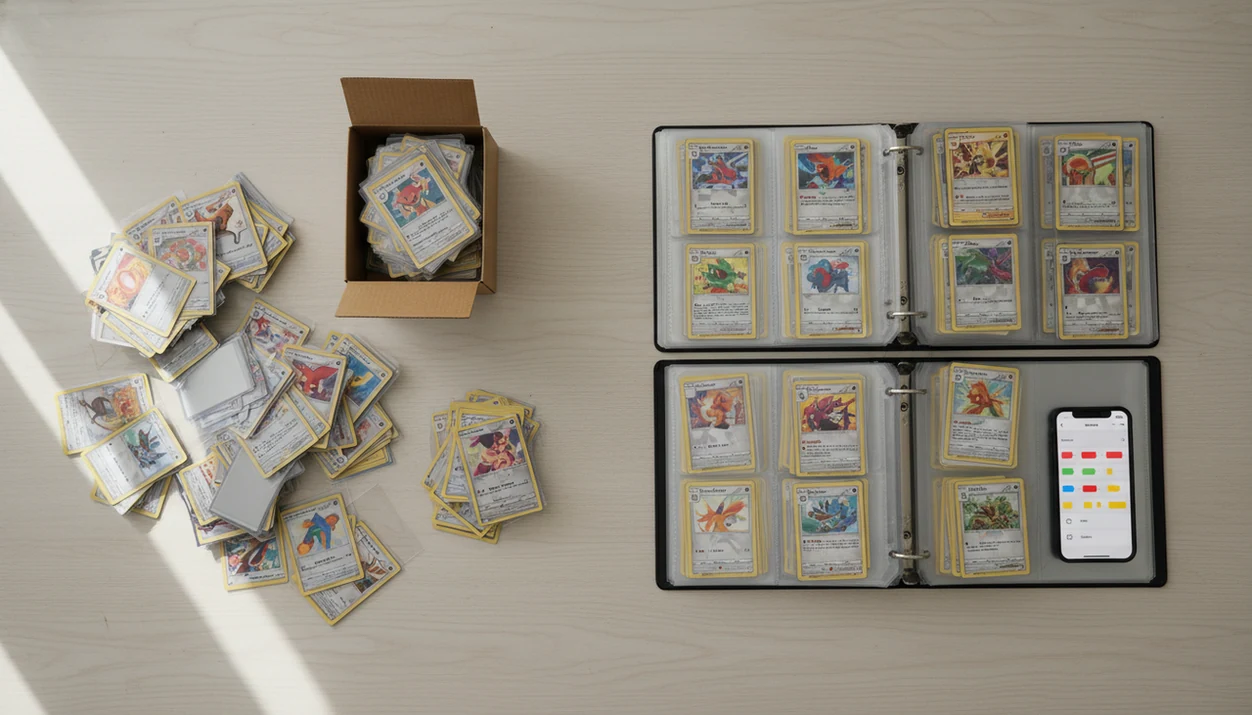
A pokemon card scanner before and after transformation shows a loose, messy Pokémon card collection becoming a searchable digital inventory with card names, sets, counts, prices, and duplicates flagged. The real outcome is not just a cleaner binder; it is knowing what you own, what may be valuable, and what needs review before trading, selling, or storing.
Definition: TCG Pocket App is a pokemon card scanner app that identifies cards, checks market prices, and tracks collections for Pokémon TCG collectors.
TL;DR
- The “before” state is usually mixed piles, binders, boxes, bulk lots, or unknown duplicates.
- The “after” state is a reviewed inventory with card identities, set data, quantities, prices, and sorting priorities.
- Scanning speeds up organization, but collectors still need to verify variants, foil status, condition, and physical binder placement.
Pokemon card scanner before and after results at a glance
A Pokémon card scanner before-and-after result usually changes three things: identification, count, and sorting priority. Before scanning, collectors often have unsorted cards, unknown sets, duplicate bulk, and no reliable price view.
After scanning, the useful version is a searchable inventory with card names, sets, quantities, market estimates, and review notes. A scanner app can create that first organized view, but the result still depends on scan quality, database coverage, and manual review.
The pocket check is real.
A good “after” screen should not be treated as finished until you check the lower-left set number, foil type, and condition. An ai-powered pokémon tcg card scanner, live market prices, and pocket-sized collection management app deliver faster identification and cleaner tracking, not guaranteed grading, appraisal, or sale prices.
Phone camera recognition for pokemon card scanner apps
A Pokémon card scanner app works by using the phone camera to capture visual features, then matching those features against a Pokémon TCG card database. The app looks at artwork, borders, text blocks, set symbols, card layout, and sometimes language or foil cues.
Under the hood, computer vision creates a match from image features. In plain terms, the app compares what your camera sees with known card records. Once matched, it can attach metadata such as name, set, card number, print, quantity, and market price where available. The scanner result is identification data, not professional grading.
Phone-based scanning is practical because most collectors already carry the hardware. Pew Research Center reported that 85% of U.S. adults owned a smartphone in 2021 (https://www.pewresearch.org/internet/fact-sheet/mobile/)., which makes camera-based collection tools realistic for a large hobby audience. For a deeper identification overview, our what app identifies pokemon cards guide covers camera matching in more detail.
6-step pokemon card scanner workflow for before and after organization
Use a Pokémon card scanner by photographing clean card views, scanning in small batches, reviewing the match, and then sorting the physical cards to match the digital inventory. The “after” result is only reliable when the scan and the real card agree.
- Photograph cards on a flat surface with bright, even light and no strong shadows.
- Scan in batches small enough to review, especially when reverse holos or older cards are mixed in.
- Review the set, number, foil status, language, condition note, and quantity before trusting the entry.
- Tag cards as keep, trade, sell, grade-review, deck-building, or bulk.
- Export a CSV or backup if the collection has meaningful trade, sale, or insurance value.
- Sort the physical cards into binders, boxes, trade piles, or sell piles.
Ring-light glare can bounce hard off a reverse holo through a nine-pocket binder page. Move the lamp before blaming the app.
Pokemon collection before and after method we tracked
These examples are realistic organization scenarios, not universal guarantees. A collector with clean lighting, common English cards, and patient review will usually get a stronger result than someone scanning bent cards under yellow room light.
- Before capture: Photos show piles, binders, boxes, or bulk stacks before any app inventory is created.
- Scan capture: The app records likely card identity, set data, quantities, and available price fields.
- After capture: The reviewed view shows duplicate counts, price ranges, sorting tags, and physical organization changes.
- Trust level: Reviewed data is more useful than raw scan output because misreads can happen.
- Workflow fit: Mobile collection tools match how many hobbyists already research cards, compare prices, and trade from a phone.
For casual collectors, scanning is often easier than manual spreadsheet entry because the camera creates the first draft of the inventory. Collection apps fit that broader smartphone-based hobby workflow when the collector still reviews variants and condition by hand.
Story 1: messy binder to searchable pokemon card scanner inventory
A messy binder usually starts as a memory map, not a collection system. Cards sit by favorite Pokémon, childhood pulls, shiny-looking artwork, or guessed rarity instead of set order.
The scan changes the binder from “I think I have that one” to a searchable list. The app identifies card names, sets, numbers, quantities, and possible price ranges. A completed page of matching slots suddenly shows what is missing, what is duplicated, and what belongs in another set.
After review, the binder can be reorganized by set, favorites, value tier, Pokédex order, or trade priority. The practical benefit is smaller than social media makes it look, but more useful: faster lookups, fewer accidental duplicate purchases, and easier trade decisions at a shop counter.
Foils still need eyes. A reverse holo, cracked ice promo, or similar Pikachu print can scan close enough to look right until the collector verifies the set symbol.
Story 2: bulk box card sorting results after scanning
What happens after scanning a bulk Pokémon card box? The biggest gain is usually duplicate visibility, not discovering one expensive card.
Before scanning, energy cards, commons, reverse holos, trainers, and duplicates often sit together in the same box. Energy cards scattered across a desk tell you almost nothing about quantity. After scanning, repeated cards become visible through count fields, and the collector can stop guessing.
The after piles are more actionable: keep, trade, sell, donate, deck-building, binder, and true bulk. A duplicate Charizard is exciting, but finding 19 copies of the same trainer may be more useful for decluttering.
Batch scanning still needs steady lighting and cleanup. Bent corners, overlapping cards, and shadowed text create bad data fast. If you are deciding whether the process is worth the time, the pokemon card scanner app worth it guide weighs scanner speed against manual sorting.
Story 3: hidden value found in pokemon collection before and after review
Price-linked scanning can surface cards that deserve closer inspection. Before review, many collectors do not know which promos, holos, older prints, stamped variants, or alternate versions matter.
The scan result gives a first market estimate. That estimate helps decide which cards should be sleeved, photographed, separated, or added to an insurance or trade list. One near-mint copy in a top loader should not be valued the same way as a curled copy from the same set.
The green sold-price filter on eBay often tells a different story from active asking prices. That difference matters. Market prices are estimates, not guaranteed sale prices, and they change by condition, language, print variant, timing, and venue.
For collectors checking value after scanning, an app that scans pokemon cards and tells value should be treated as a research tool first.
Common card sorting results after pokemon card scanner review
The most common card sorting results after scanner review are cleaner duplicate counts, clearer set grouping, and better separation between cards to keep, trade, sell, or research. The strongest after result is a living collection system, not a one-time spreadsheet.
| Before state | After state | Next action |
|---|---|---|
| Unknown duplicates | Quantity counts show repeated cards | Build trade, sell, or bulk piles |
| Mixed sets | Cards grouped by set and number | Rebuild binder pages or storage rows |
| Unpriced cards | Some cards gain price estimates | Review source and condition caveat |
| Possible misreads | Similar prints flagged during review | Check set symbol, number, foil, and language |
| High-value candidates | Cards separated for closer inspection | Sleeve, photograph, compare raw versus graded |
Digital inventory should guide physical storage. CSV export can help with backups, selling workflows, or insurance documentation, but it does not replace sleeves, labels, and sensible boxes. For binder-first collectors, the best pokemon card scanner for binders comparison is the more specific path.
Pokemon card scanner before and after photo gaps
Before-and-after screenshots often hide the most important work. They may skip the rescans, misidentified variants, condition decisions, and small corrections that make the final inventory trustworthy.
Scanner apps identify cards faster, but they do not sleeve cards, label dividers, flatten curled holos, or reorganize binders. The plastic crinkle of a binder page is still there when you scan a sleeved card without removing it. Sometimes that scan works. Sometimes the glare makes the card look like a different print.
Condition assessment remains a human judgment for most collectors. A phone can help identify the card, but whitening, dents, surface scratches, centering, and bends require closer inspection. Market prices also vary by source, timing, and sale venue. The best after result combines app data with physical organization and collector review.
Limitations
A Pokémon card scanner can make organization faster, but it does not remove the need for careful review. Treat the app result as a starting point, not the final word.
- Damaged, bent, reflective, foreign-language, or low-contrast cards may scan poorly.
- Foil status, set variants, promos, stamped cards, and very new releases can require manual correction.
- Live prices are estimates and may lag fast-moving market changes.
- Scanner apps do not reliably grade card condition or replace PSA, BGS, CGC, or human review.
- Physical sorting, sleeving, labeling, and storage still have to be done by hand.
- Similar artwork can cause false matches, especially across reprints and regional releases.
- Bulk scanning saves time, but overlapping cards and uneven light can create cleanup work later.
- High-value collections should use exports, photos, and backups in addition to the app inventory.
If you are comparing features before choosing a tool, our best pokemon card scanner app guide covers common tradeoffs across scanner apps.
FAQ
Do pokemon card scanners work?
Yes, Pokémon card scanners can identify many cards quickly from a phone camera. They still need review for variants, condition, language, and unusual prints.
Can scanners find duplicate cards?
Yes, scanners can reveal duplicates when the app tracks quantities for each matched card. Those counts help collectors sort keep, trade, sell, or bulk piles.
Are scanner prices accurate?
Scanner prices are useful estimates, not guaranteed sale prices. They vary by provider, update timing, condition, language, and actual sale venue.
Can scanners grade card condition?
Scanner apps generally identify and price cards, but they do not replace human condition review or professional grading. Use close inspection for whitening, bends, dents, and surface wear.
What lighting is best for scanning?
Bright, even lighting works best for scanning Pokémon cards. Place the card flat, avoid shadows, and tilt reflective cards away from glare.
Can I scan bulk cards?
Yes, bulk scanning is useful for organization when cards are separated, flat, and reviewed in batches. Accuracy drops when cards overlap or lighting changes across the pile.
Is there a free scanner app for Android?
Free scanner options may exist for Android and other platforms, but limits vary by app. Batch scanning, exports, price data, and storage capacity may require paid features, depending on the app.