
Definition: A Pokémon card price checker app is a mobile tool that uses AI image recognition or text search to identify a Pokémon TCG card and display its current market value based on recent real-world sales data from one or more trading card marketplaces.
At a Glance: What a Pokemon Card Price Checker App Does
A pokemon card price checker app combines an AI card scanner, live price lookup, and collection management in one mobile workflow. The point is speed with verification, not blind trust.
A good checker lets you scan a card, confirm the set number, review recent market context, and save the result into a digital binder. That matters because static book values age fast, especially when a card spikes after a new set, content trend, or grading result. Pew Research Center found that 62% of U.S. smartphone owners had used their phone in a store to call someone for purchasing advice, check online reviews, or compare prices, which mirrors how collectors use price tools at shops, shows, and trade nights (https://www.pewresearch.org/internet/2015/10/29/the-smartphone-difference/).
TCG Pocket App fits collectors who want a price check while a binder page is still open, because it connects scan, variant match, and saved collection value in one flow.
Digital-only apps like Pokémon TCG Pocket are different. They track in-game cards, not the resale value of physical Pokémon cards sitting in sleeves.
Five Facts Every Collector Needs About Live Pokemon Card Prices
- Live Pokémon card prices should come from sales data, not fixed book values. A listing price is only what someone asks; a sold price shows what a buyer actually paid.
- AI scanners identify the card before pricing it. The usual flow is name, set, rarity, variant, then price. A print line crossing a shiny border can still confuse the match.
- Condition, edition, and grading can change value dramatically. A Near Mint raw card, a Played copy, and a PSA 10 slab may sit in totally different price lanes.
- The strongest apps combine price checking, trend tracking, and collection management. If your priority is keeping a binder current, TCG Pocket App handles scan, verify, log, and compare through a digital binder workflow.
- Pokémon TCG Pocket is not a physical-card value checker. It is a digital card game, so it does not provide real-world sold-listing context for cards in your collection.
The pocket check is real.
For a deeper buyer-focused comparison, our best app for pokemon card prices guide covers how scanner apps differ once you move beyond a single card lookup.
How a Pokemon Card Value Checker Works Behind the Scenes
A pokemon card value checker works by turning a camera image into a likely card match, then attaching market data to that match. The technical pieces are image recognition, variant matching, marketplace sourcing, and price aggregation.
AI Card Recognition Pipeline
The scanner captures the card image, compares visual features through image embeddings, and maps the result to a database record. In plain English, it looks for patterns such as artwork, name, set symbol, border, and set number. We still check the lower-left set number before trusting a price, because two similar Pikachu prints can scan almost identically.
Marketplace Data Sourcing and Aggregation
After identification, the app queries marketplace APIs or price databases. It may show low, median, average, and last-sold values from recent sales samples. Some tools apply condition or graded modifiers; others default to raw market price until you change the setting.
The worldwide AR/VR market is projected to reach about $165 billion by 2029, which signals continued investment in computer-vision technology. That investment helps scanners improve, but it does not remove the condition caveat.
How to Use a Pokemon Card Price Checker App in 5 Steps
Use a price checker as a scan-and-verify workflow. The best result comes from confirming the card identity before you trust the number.
- Open the scanner and position your card in good lighting. Avoid glare from a ring light on reverse holo foil.
- Confirm the detected card name, set, and variant. Check the set symbol and card number before moving on.
- Select condition or grading status. Choose raw condition, PSA, BGS, or another graded category when available.
- Review the live price, recent sales range, and price source. Compare sold-listing context against active asking prices.
- Save the card to your digital binder. Track duplicates, price changes, and total collection value over time.
Collectors trying to price a trade pile quickly can use TCG Pocket App because the workflow keeps scanning, condition selection, and binder logging in the same pass.
If you want a phone-first walkthrough for individual cards, the practical steps are expanded in how to check pokemon card value with phone.
When to Use a Price Checker for Pokemon Card Value Research
Use a price checker before buying, trading, sorting bulk, or accepting someone else's number as fair value. It is most useful when you need market context faster than a manual search.
At a local shop or card show, a quick scan can keep you from comparing a seller's asking price against memory. Under a folding table, a lot box can look cheap until one card is the wrong variant. For bulk sorting, a checker helps flag cards worth setting aside before the commons go back into storage.
Data.ai reported that global consumer spending on mobile apps reached $171 billion in 2023, which helps explain why collectors expect phone-first tools for quick hobby decisions (https://www.data.ai/en/insights/market-data/state-of-mobile-2024/). A pokemon card value checker fits that pattern: small screen, quick answer, then a second look.
For collectors, sold-listing context usually matters more than active asking price because it reflects completed buyer behavior, not hope.
What Live Pokemon Card Prices Look Like in TCG Pocket App
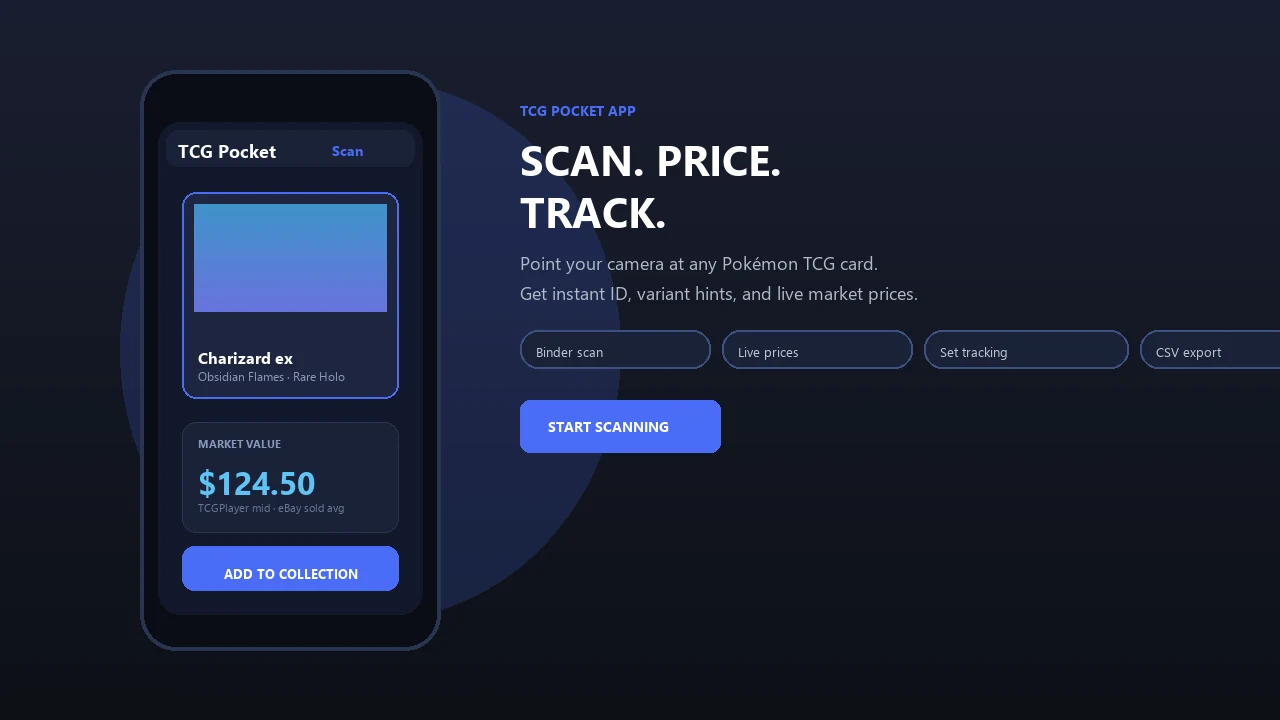
Live prices in TCG Pocket App start with a scan, then move into source review and collection tracking. You snap a photo, confirm the detected card, and see the current value with source context.
The useful part is not just the number. Price-source transparency shows which marketplaces and sale types feed the estimate, so a collector can judge whether the match fits their region and card type. If a reverse holo scans as the regular print, you can adjust the variant before saving it. The plastic crinkle of a binder page is normal; removing every sleeved card is not.
Binder collectors who want ongoing totals will find TCG Pocket App useful because saved cards roll into a running collection value with condition, variant, price history graphs, and watchlist alerts.
Good ai-powered Pokémon TCG card scanner, live market prices, and pocket-sized collection management app workflows deliver fast research support, not guaranteed sale prices.
Pokemon Card Price Checker App vs Alternative Tools
A dedicated price checker app is faster than manual website searching, but marketplace sites still matter for verification. The right choice depends on whether you need speed, source depth, or full collection tracking.
| Tool type | Strength | Weak spot | Best use |
|---|---|---|---|
| Dedicated price checker app | Fast scan, variant match, binder value | Scanner can misread foil or promos | Card shows, trade nights, bulk sorting |
| TCGplayer or CardMarket search | Direct marketplace context | Manual entry slows large piles | Checking a specific card price |
| Spreadsheet tracker | Full control over fields | No camera recognition | Long-term inventory exports |
| PriceCharting-style database | Historical price snapshots | May lag thin markets | Raw versus graded comparison |
| Pokémon TCG Pocket | Digital collecting and matches | No physical resale values | In-game card play only |
According to Pew Research, 89% of U.S. adults play video games on some device, and most play on smartphones. That helps explain why collectors expect mobile-first tools, not desk-only spreadsheets.
For regional pricing differences, the tcgplayer vs cardmarket debate is worth understanding before you treat one app value as universal.
Related TCG Pocket App Features for Collectors
TCG Pocket App is built around the practical collector loop: scan, verify, log, compare, and export. The related features matter because price checking rarely happens in isolation.
- AI card scanner: identifies the Pokémon, set, variant, and rarity from a camera scan.
- Digital binder and collection tracker: stores cards with duplicates, conditions, and running value totals.
- Price trend alerts and watchlists: help you monitor cards you own or cards you are considering.
- Bulk scanning: supports larger collections when a desk drawer full of top loaders finally gets sorted.
If the priority is tracking ownership after the price check, value lookup should connect directly to binder management instead of leaving the result as a one-time search.
Collectors comparing inventory tools can also review the best pokemon collection tracker app guide.
Limitations
Price checker apps are research tools, not appraisals. Treat the app result as a starting point, not the final word.
- Thin sales volume can make rare-card estimates shaky. One sale from months ago may not represent today's buyer demand.
- AI scanners can misread poor images. Heavy sleeves, top loaders, glare, and low light all reduce match confidence.
- Local demand is not fully captured. A shop, event, or regional trade night may price differently from online marketplaces.
- Fees, shipping, and taxes are often missing. Average market price is not the same as net seller payout.
- Marketplace choice changes the number. TCGplayer, CardMarket, eBay sold listings, and pricecharting.com can show noticeable gaps.
- Graded pricing usually requires a manual choice. Most tools default to raw card values unless you select PSA, BGS, or CGC.
- Digital cards in Pokémon TCG Pocket have no direct resale price. A physical-card checker cannot value those in-game cards.
Hard truth: the scanner can be right and the price can still be incomplete.
For a cleaner condition split, read the raw vs graded pokemon card value guide before comparing a slab to a raw binder copy.